Every laptop, phone and chair: who has it and where it is
FlowAssets is asset management for growing companies: an asset register with QR tags, a record of who has each asset and where it is, and a My assets page for every employee. Moves, write-offs and disposals follow your approval rules, and assets still out hold back an employee's exit clearance.
Price per company, however many assets
Assets forgotten at exit: IT clearance waits for them
Tag outputs: A4 PDF and label printers
Item catalogue shared with FlowInventory
Assets tracked in a spreadsheet
- Nobody is sure who has which laptop, or since when
- Handovers happen on chat, with no record of the charger or the condition
- People leave with company devices because IT finds out too late
- Write-offs and disposals happen without anyone signing off
A register that knows your people
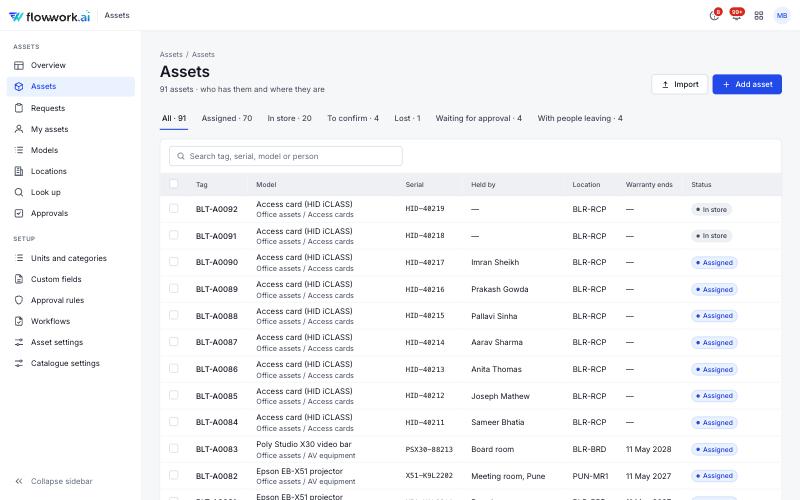
- Every asset tagged, with its holder, location and full history
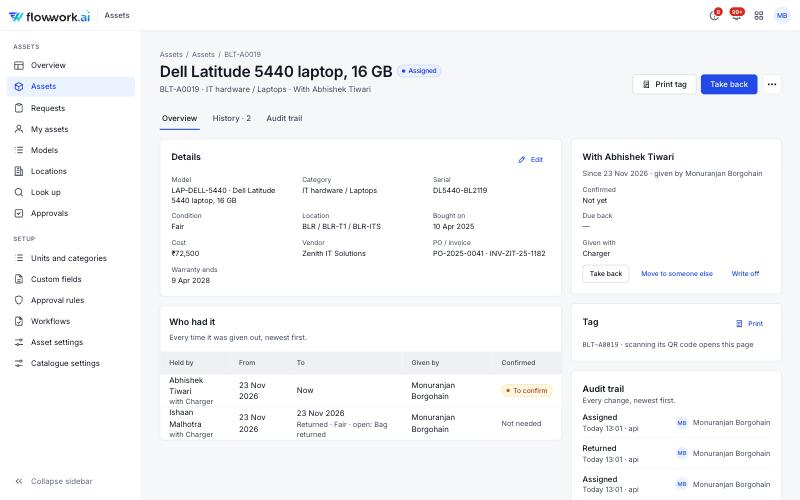
- Handover and return recorded, with what went with it and its condition
- IT clearance in People offboarding waits until assets are back or written off
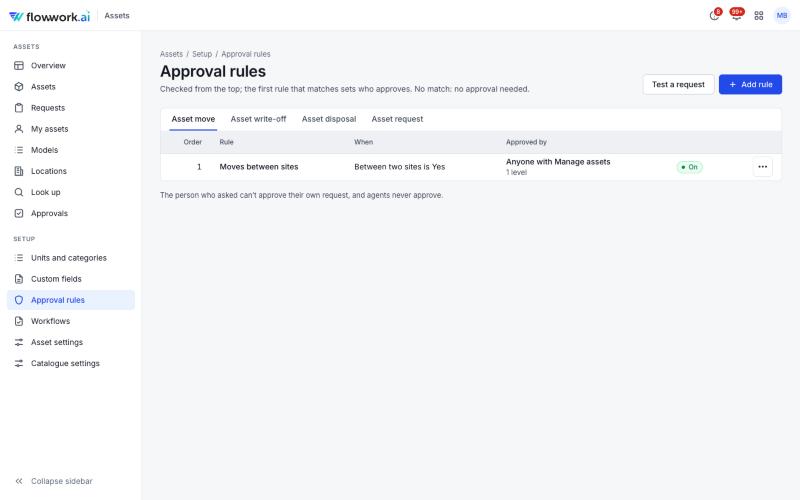
- Moves between sites, write-offs and disposals follow approval rules
What FlowAssets does
Everything below is available in the product today.
Asset register
Tagged and importedAdd assets with tags in your own series, add several copies of one model at once, or import them from Excel with their holders by work email. Look any asset up by tag or serial number.
QR tags
Scan to openPrint QR tags on A4 label sheets or label printers. Scanning a tag opens the asset for the team and My assets for its holder.
Give and take back
Custody on recordGive an asset to a person, team or location with what went with it, and take it back with its condition and a checklist, including a data wipe for IT equipment. Holders confirm they have it, per category.
Requests and moves
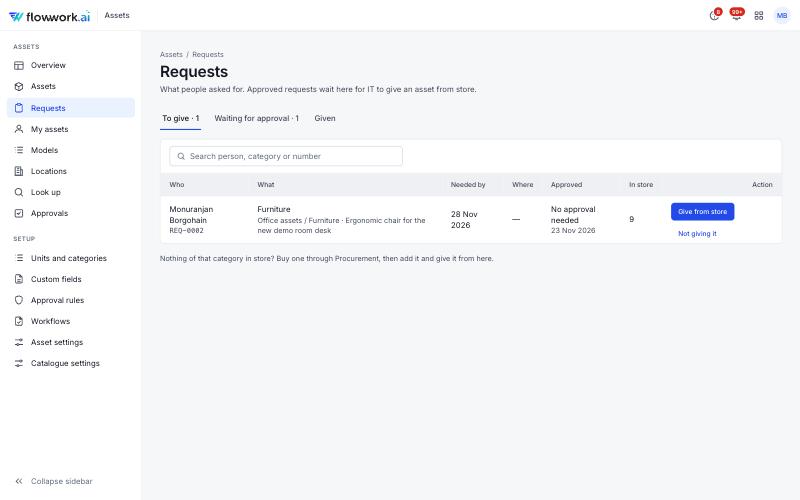
With approvalsEmployees ask for what they need from My assets; IT gives from store or declines. Moves between sites, write-offs and disposals follow your approval rules, with finance added above an amount.
People leaving
Back before exitAssets held by people with an active offboarding show in their own tab, and the IT clearance step in People offboarding stays open until they are returned or written off.
History and audit
Every change keptEach asset shows who had it, from when to when, who gave it and whether they confirmed, plus an audit trail of every change.
See FlowAssets
Screens from the product, with sample data.
An asset's life in FlowAssets
Add and tag
Add the asset or import it from Excel, and print its QR tag.
Give
Give it to a person, team or location; the holder confirms they have it.
Move or request
Move it between people or sites, or give from store when someone asks.
Take back
Take it back with its condition, or write it off or dispose of it with approval.
Works with the rest of flowwork.ai
Built for
IT and admin
Know who has every device, hand it over properly and get it back.
HR
Close exits with every company asset returned or written off.
Employees
See what you hold, confirm it, and ask for what you need.
FlowAssets pricing: one plan, every feature
Per month, billed annually, excluding taxes. Free plan to start.
One price per company, however many assets and employees you have.