Know what is in stock, in which bin, from which batch
FlowInventory is inventory management for companies that keep stock: an item catalogue with photos, warehouses and bins, batches and serial numbers, and a stock ledger that can't be edited. Deliveries are received against FlowProcure purchase orders, checked for quality and put away, so stock on hand always matches what came in.
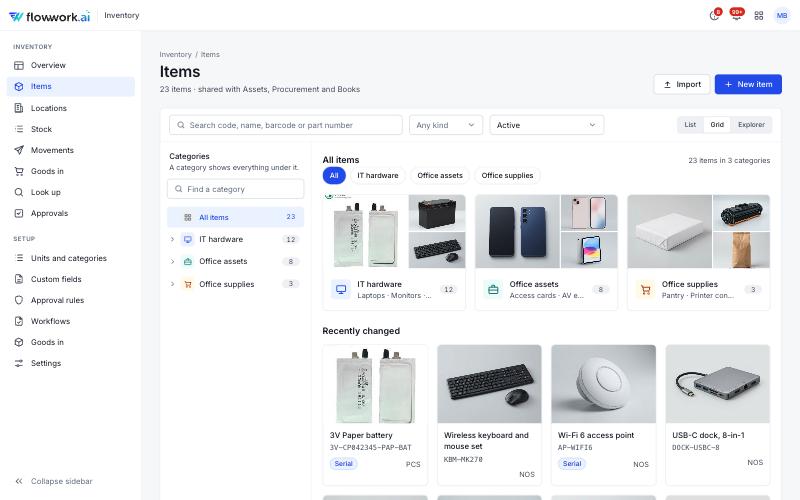
Item catalogue for Inventory, Assets and Procurement
Edits to posted movements: mistakes are reversed
Users in one company price
Label outputs: A4 PDF and Zebra/TSC
Stock kept in spreadsheets and memory
- Item lists differ between the store, purchase and accounts
- Nobody can say which bin or batch a part is in
- Deliveries are counted on paper and typed in later, if at all
- Stock figures are edited by hand, so nobody trusts them
One ledger from goods in to the shelf
- One item catalogue, with photos, shared by every module
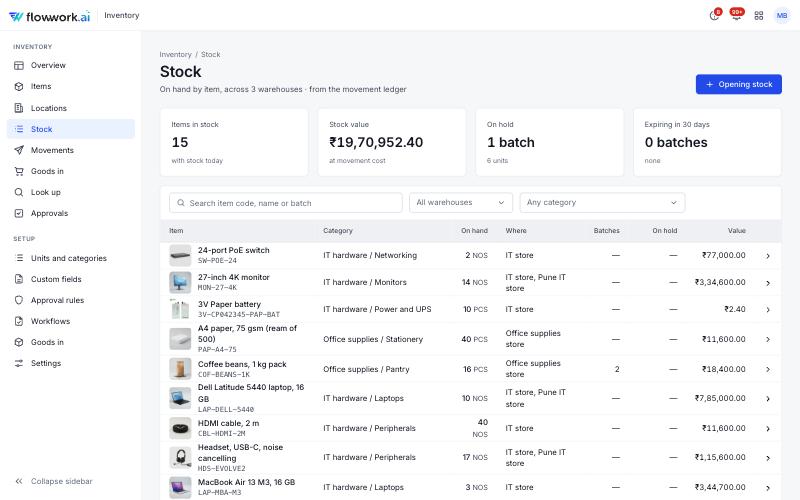
- Stock by item, bin and batch, with expiry dates and serial numbers
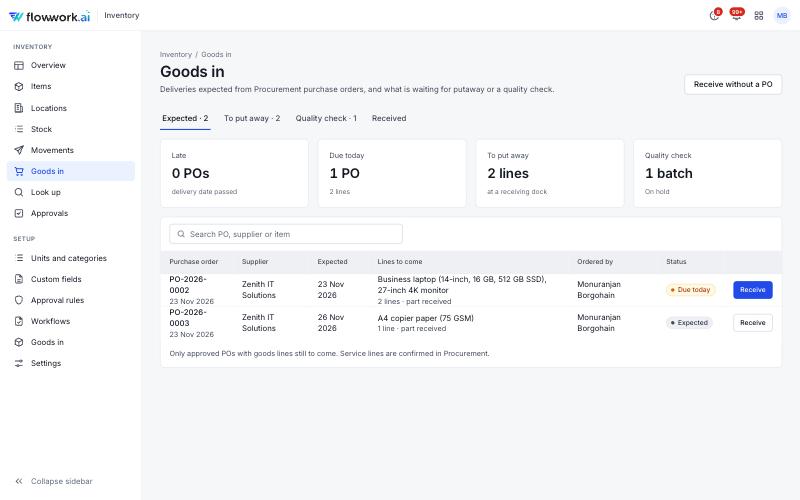
- Goods received against the purchase order, on hold until quality releases it
- Every change is a movement that can't be edited; a mistake is reversed
What FlowInventory does
Everything below is available in the product today.
Item catalogue
One list for everyoneItems with units, categories, HSN/SAC codes, barcodes, custom fields and photos, shared with FlowAssets and FlowProcure. Browse them as a list, a photo grid or a category explorer.
Warehouses and bins
Where it isSet up sites, warehouses and bins, import them from Excel, and see the stock in each place. Each warehouse starts its stock on its own date.
Labels
Barcodes and QR codesPrint labels for items and bins on A4 label sheets as a PDF, or send them straight to Zebra and TSC label printers.
Stock ledger
Can't be editedOpening stock by hand or from Excel (checked before anything is saved), batches with expiry dates, serial numbers, and a movement ledger where a mistake is corrected by a reversal.
Goods in
Against the purchase orderSee what is expected from FlowProcure purchase orders, receive it with batch and bin, and the goods receipt is recorded in Procurement for the 3-way match in FlowBooks. Receipts without a PO work too.
Quality and putaway
Before it can be usedItems marked for inspection arrive on hold until someone releases or rejects them, in part if needed. Warehouses can receive to a dock first and put away from a list.
See FlowInventory
Screens from the product, with sample data.
From purchase order to the shelf
Order
A purchase order is approved in FlowProcure and shows up as expected in Goods in.
Receive
The store receives what arrived, with batch, expiry and bin; the goods receipt goes back to Procurement.
Check
Items that need inspection wait on hold until quality releases or rejects them.
Put away
Stock moves from the dock to its bin, and stock on hand updates from the ledger.
Works with the rest of flowwork.ai
Built for
Stores and warehouse teams
Receive, put away and find stock by bin, batch or serial.
Purchase and quality
See what is due, what arrived and what is on hold for inspection.
Owners and finance
Trust stock on hand and its value, with every change on record.
FlowInventory pricing: one plan, every feature
Per month, billed annually, excluding taxes. Free plan to start.
Priced per company with 5 users included. The item catalogue it shares with Assets and Procurement is free.